


Types of evaluation
Flags
Flags are boolean (on/off) values that we evaluate against features using Featurevisor SDKs in our applications.
They are one of the 3 different types of values that we can evaluate against features, including:
- Flags (you are here)
- Variations
- Variables
Visual explanation#
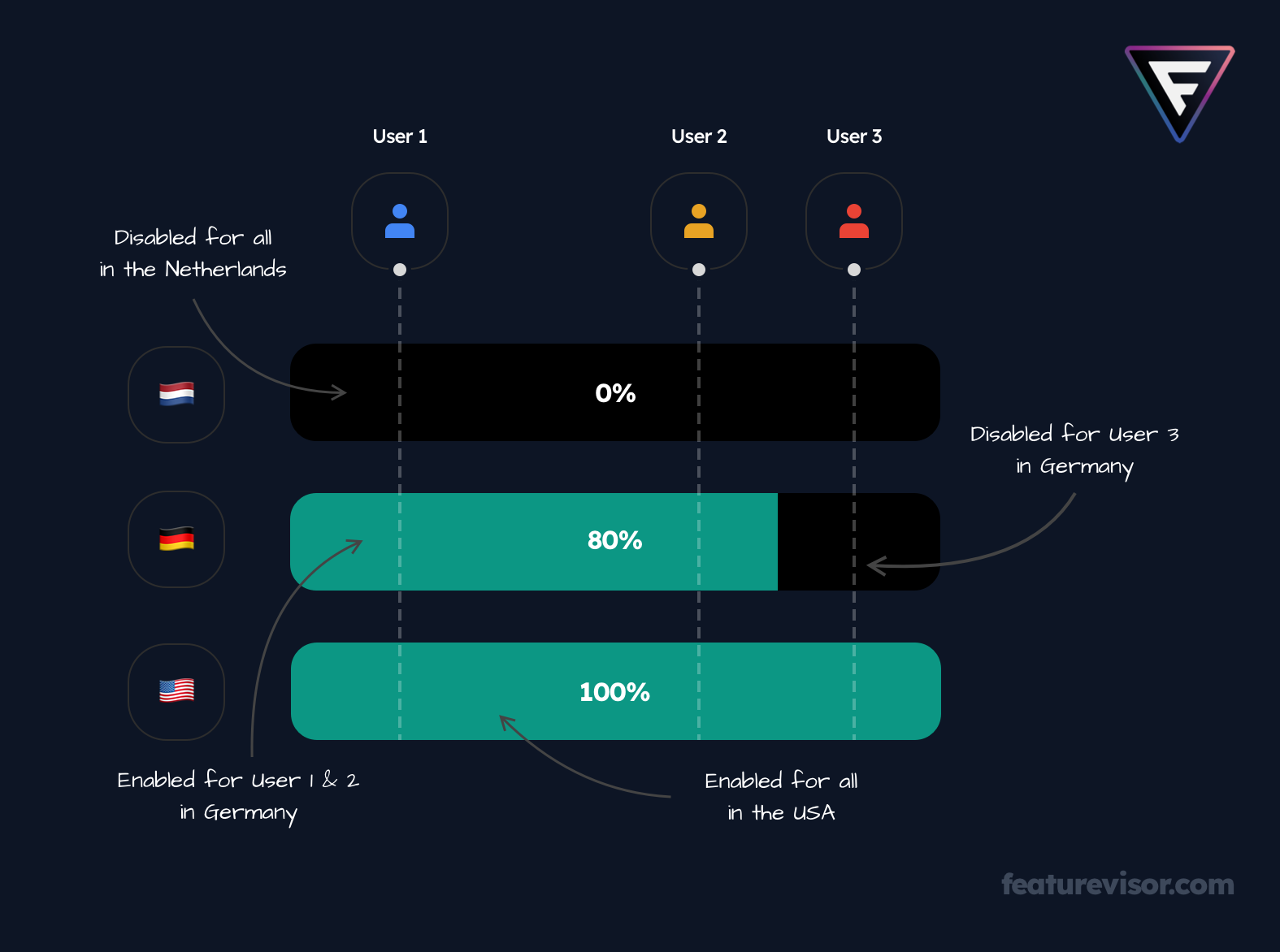
Above we can see that:
- We have 3 different users coming to our application
- We have 3 different rules targeting the Netherlands, Germany, and US
- Each rule having a different rollout percentage
Below we will find out how to express this requirement as a feature in Featurevisor.
Expressing the feature#
Assuming we already have the segments created for the countries, we can define our feature as follows:
features/my_feature.yml
description: My feature description here...tags: - web - ios - androidbucketBy: userIdrules: production: - key: nl # any unique string is fine here segments: netherlands # references segments/netherlands.yml percentage: 0 # 0 means disabled for all - key: de segments: germany percentage: 80 - key: us segments: usa percentage: 100Learn more in:
- Features: express more complex features
- Tags: generate separate datafiles (JSON files) containing only the features we need for our application(s) to load on demand
- Bucketing: allows evaluating values consistently for the same user throughout the whole session across different devices (for e.g., a page refresh should not lead to evaluating a different value for the same user)
- Rules: different rules different sets of segments with their own gradual rollout percentage value
- Environments: for having different sets of rules per environment (like staging and production)
Mapping the evaluations#
Above rules for the feature my_feature suggest that:
- Everyone in the Netherlands would see it as disabled
- 80% of traffic in Germany would see it as enabled (other 20% would see it as disabled consistently)
- 100% of traffic in USA would see it as enabled
Usage of SDK#
If we take JavaScript SDK as an example, flag values can be evaluated as follows:
your-app/index.js
import { createFeaturevisor } from '@featurevisor/sdk'// create Featurevisor SDK instanceconst f = createFeaturevisor({ datafile: { ... }});// set some common context to evaluate values againstf.setContext({ userId: '123',});const myFeatureIsEnabled = f.isEnabled('my_feature_name');const anotherFeatureIsEnabled = f.isEnabled('another_feature');Learn about more advanced use cases for evaluations here.