


Definitions in depth
Variable schemas
A schema says what a variable may hold. Write it inline in the variable, or put it in schemas/ and reuse it by name. Linting checks every default and override against it, and code generation turns it into types.
Describe a value#
Every variable describes its value with the same fields. A global variable puts them at the root of its file, and a feature variable puts them under its key in variablesSchema. checkoutSettings from Variables is an object with a string and an array of strings:
description: Checkout settingstype: objectproperties: currency: type: string paymentMethods: type: array items: type: stringrequired: [currency, paymentMethods]defaultValue: currency: EUR paymentMethods: [card]propertieslists an object's keys, each with its own schema. Objects can nest.requiredlists the keys that must be present. As in JSON Schema, any key it does not list is optional, so withoutrequiredevery key is.itemsdescribes every element of an array. Without it, an array holds strings.- An object without
propertiesaccepts a flat object of strings, numbers, booleans andnull.
Featurevisor uses a subset of JSON Schema. Variables lists the types.
Constrain values#
These keywords narrow what a value may be. They act as guardrails: whoever changes a value in a pull request gets a lint error before an invalid one can ship.
| Keyword | Applies to | Requires |
|---|---|---|
enum | Any type | One of the listed values |
const | Any type | Exactly this value |
minimum, maximum | integer, number | A number in range |
minLength, maxLength | string | A length in range |
pattern | string | A match for a regular expression |
format | string | A timestamp or a comparable version |
minItems, maxItems | array | A number of items in range |
uniqueItems | array | No duplicate items |
Limit checkoutSettings to two currencies and at least one distinct payment method:
# ...type: objectproperties: currency: type: string enum: [EUR, GBP] paymentMethods: type: array minItems: 1 uniqueItems: true items: type: stringAn override that sets currency: USD now fails lint with Value at "currency" in variable "checkoutSettings" must be one of the allowed enum values (got "USD"), followed by the path of the offending override, such as overrides.0.mutate.currency.
pattern uses JavaScript regular expression syntax. enum values must match the declared type.
Date strings#
Store a timestamp as type: string with optional format: date-time to have lint validate portable timestamps:
description: Checkout launch instanttype: stringformat: date-timedefaultValue: '2026-11-27T00:00:00Z'This checks defaults, disabled values, enum, const, override values and mutation results wherever values are validated against the schema. It works in feature variablesSchema, reusable schemas and nested properties, items, additionalProperties and oneOf branches. Formats apply only to strings. A variable with format: date-time compares only with before, after and the presence operators in conditions, like a timestamp attribute.
The format is an authoring constraint, not a datafile field or an SDK validator. Generated variable types stay string. Plain strings can still be compared with before and after without declaring a format.
Version strings#
Use format: semver for a version that the version operators compare:
description: Oldest app version that gets the new checkouttype: stringformat: semverdefaultValue: '5.5.0'Lint rejects values these operators cannot compare, such as 5.5,0. Versions like 5.5 and v5.5.0 are accepted. date-time and semver are the only formats. Any other format is a lint error.
Reuse a schema#
When several variables hold the same shape, define it once in schemas/. The file name is its key:
description: A notice shown to userstype: objectproperties: id: type: string label: type: string message: type: stringrequired: [id, label, message]Reference it with schema in place of type, properties and items. This global variable is the notice shown while the maintenanceMode kill switch from Conditions is on:
description: Shown while pausedschema: noticedefaultValue: id: maintenance label: Maintenance message: Checkout is back shortlyA feature variable references it the same way:
# ...variablesSchema: greeting: schema: notice defaultValue: id: greeting label: Chat message: How can we help?Schemas can reference other schemas, so a list of notices is a schema too:
description: A list of noticestype: arrayitems: schema: noticecheckoutNotices from Mutations can now describe its items by name:
description: Notices shown during checkouttype: objectproperties: items: schema: noticesrequired: [items]defaultValue: items: - id: base label: Base message: Standard noticeA schema reference works anywhere a schema does: at the root, in properties, in items and in oneOf. It cannot be combined with inline fields at the same level.
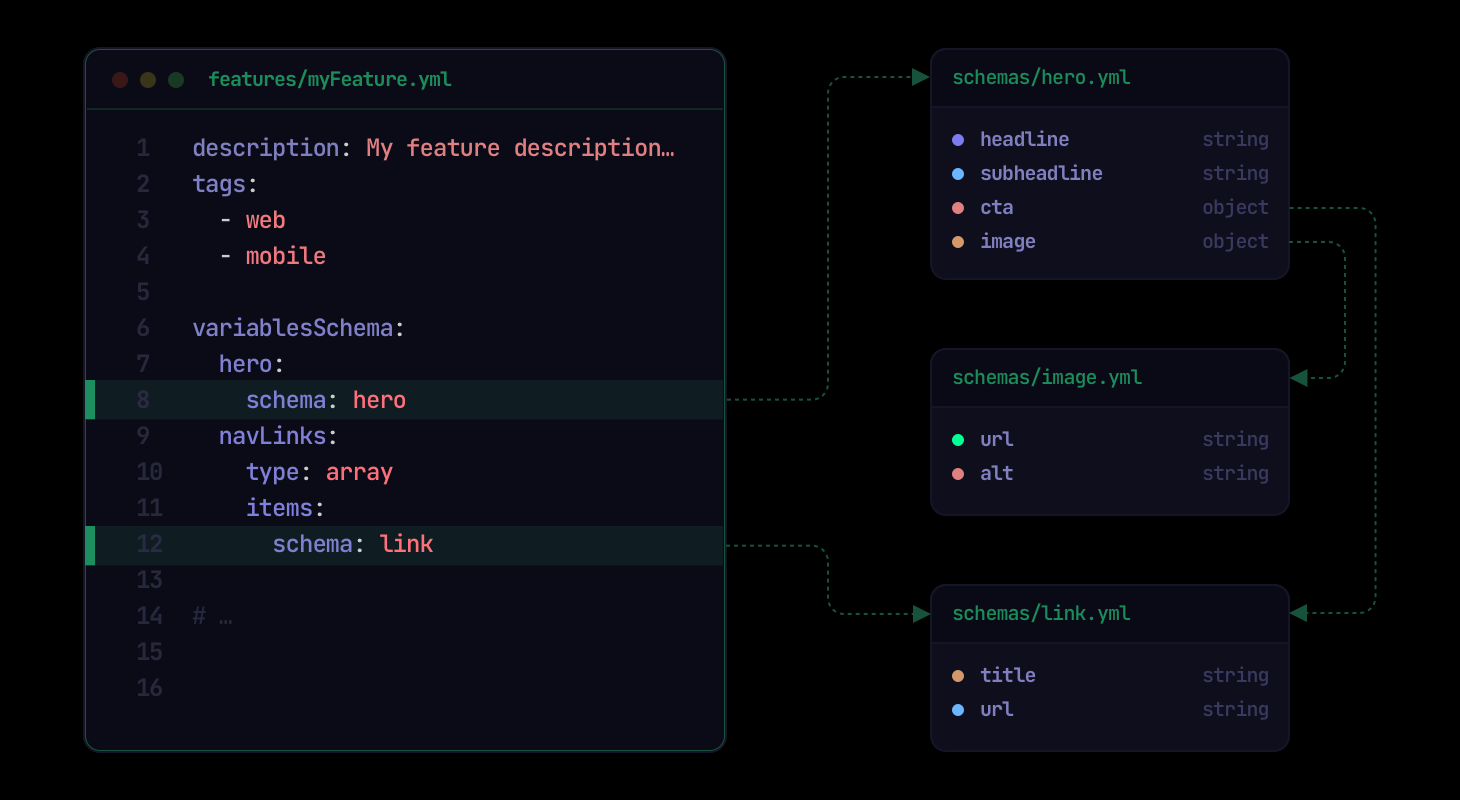
The illustration shows the same idea with a different set of schemas: a feature's variables refer to schemas by name, and those schemas refer to further schemas.
Choose between shapes#
Use oneOf when a value may take one of several shapes. It must match exactly one of them:
description: ID from several systemsoneOf: - type: string - type: integerdefaultValue: anonymousGive oneOf at least two branches. Each branch is a full schema, so it can use enum, const, nested objects or a schema reference, such as a string or a whole notice. A variable uses one of type, oneOf or schema, never two.
Allow any key#
additionalProperties accepts any key, with one schema for every value. checkoutLabels maps locales to the label of the pay button:
description: Pay button label per localetype: objectadditionalProperties: type: stringdefaultValue: en-GB: Pay now nl-NL: Nu betalenadditionalProperties can be a schema reference, and can sit alongside fixed properties.
Hold raw JSON#
The json type holds a JSON string that Featurevisor does not inspect:
description: Payment provider configtype: jsondefaultValue: '{"provider": "adyen", "retries": 3}'SDKs have a JSON getter that parses it. Prefer object whenever you know the shape, so linting can check it.
Promotable#
In a project that uses sets, a reusable schema can protect its existing destination definition from later promotions by setting promotable: false at the top level:
description: A notice shown to userspromotable: falsetype: objectproperties: id: type: string label: type: string message: type: stringIf the destination schema exists, it remains unchanged when either the source or destination schema has this field. A missing destination schema is still created and retains promotable: false. The field protects the whole file, so it cannot go inside properties, items or oneOf.
Lint and generate types#
npx featurevisor lint checks every default, override and mutation against its schema, including referenced schemas. Code generation turns reusable schemas into named types for your application.