


Definitions in depth
Variable mutations
A mutation changes part of a variable's value and keeps the rest, so an override does not have to repeat the whole object. This page shows every change you can make to objects and arrays, then how mutations are ordered and how overrides build on each other.
Objects#
Change one property of an object variable, and the others keep their values. Paths inside mutate are relative to the variable, and a dot reaches into a nested object.
Set a property#
checkoutSettings holds a currency and a list of payment methods. British users pay in pounds:
description: Checkout settingstype: objectproperties: currency: type: string paymentMethods: type: array items: type: stringdefaultValue: currency: EUR paymentMethods: [card]overrides: - key: britain conditions: - attribute: country operator: equals value: gb mutate: currency: GBPBritish users get { currency: GBP, paymentMethods: [card] }. The mutate map changed currency and left paymentMethods alone. An override with value instead would replace the whole object, so it would have to repeat the payment methods. Each override takes exactly one of the two.
Set a nested property#
checkoutLimits has an object inside it, daily:
description: Order limits in checkouttype: objectproperties: perOrder: type: integer daily: type: object properties: amount: type: integer orders: type: integer required: [amount]required: [perOrder]defaultValue: perOrder: 250 daily: amount: 1000 orders: 5A dotted path changes one property of daily:
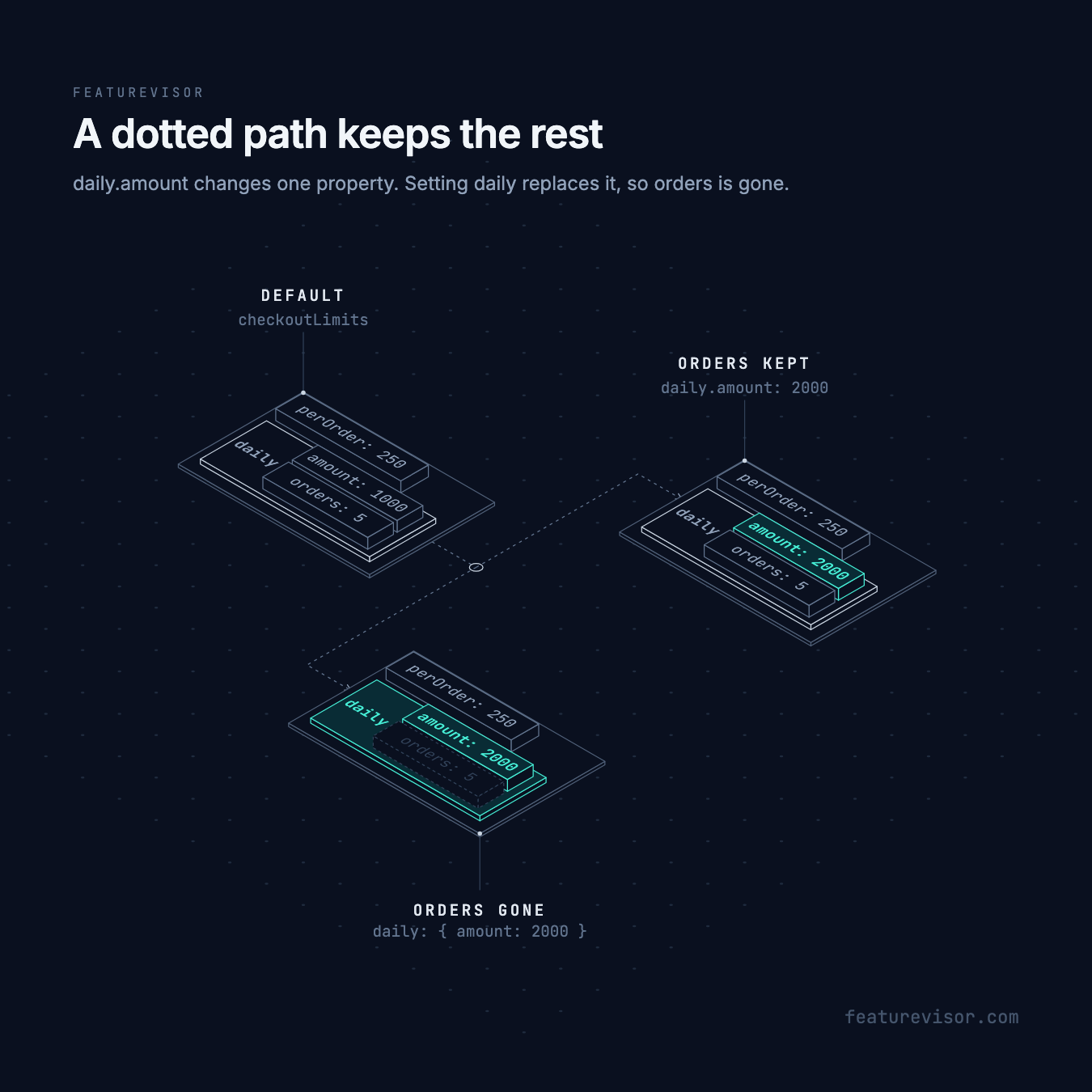
# ...overrides: - key: netherlands conditions: netherlands mutate: daily.amount: 2000Dutch users get a daily amount of 2000, with perOrder and daily.orders unchanged.
Replace a nested object#
Setting an object replaces it. It does not merge with the object it replaces:
# ...overrides: - key: netherlands conditions: netherlands mutate: daily: amount: 2000Dutch users get daily: { amount: 2000 }, without orders. Use a dotted path, as above, to keep the other properties. Either way, perOrder stays 250, since only daily changes.
Remove a property#
:remove takes a property out. Its value is ignored, so true is conventional:
# ...overrides: - key: netherlands conditions: netherlands mutate: daily.orders:remove: trueDutch users get daily: { amount: 1000 }. A property listed in required cannot be removed, and lint says so. Properties that required does not list are optional, so they can be removed.
Arrays#
Setting an array replaces it. To change part of it, put an operation after a colon, or select an item with brackets. Quote a key that contains a colon or brackets.
Arrays of plain values#
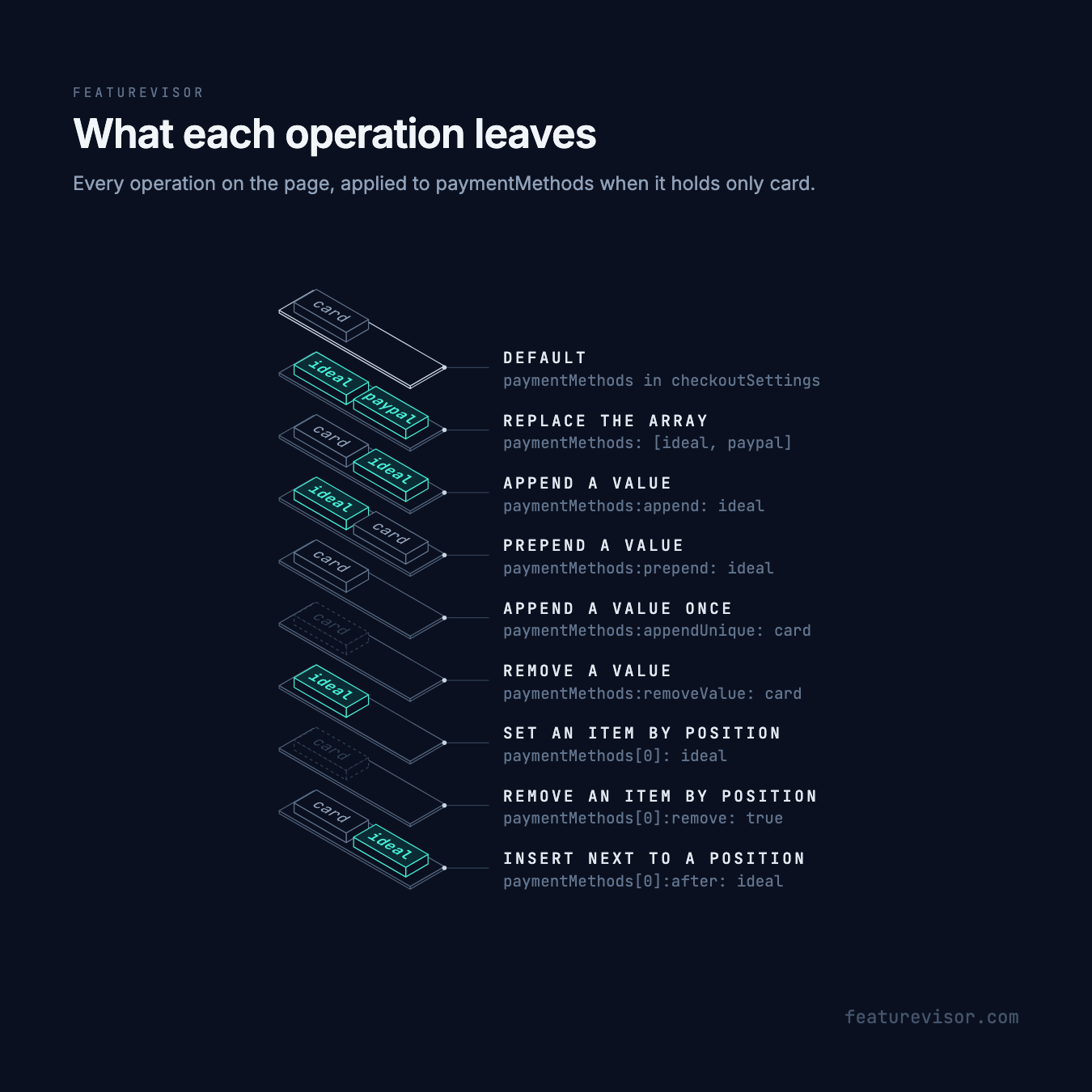
These operations work on arrays of strings, numbers or booleans. The examples change paymentMethods in checkoutSettings above, which defaults to [card].
Replace the array#
# ...overrides: - key: netherlands conditions: netherlands mutate: paymentMethods: - ideal - paypalDutch users get [ideal, paypal].
Append a value#
# ...overrides: - key: netherlands conditions: netherlands mutate: paymentMethods:append: idealDutch users get [card, ideal].
Prepend a value#
# ...overrides: - key: netherlands conditions: netherlands mutate: paymentMethods:prepend: idealDutch users get [ideal, card].
Append a value once#
appendUnique adds the value only if it is not there yet, so several overrides can add the same method safely:
# ...overrides: - key: netherlands conditions: netherlands mutate: paymentMethods:appendUnique: cardDutch users keep [card]. It does not remove duplicates that already exist.
Remove a value#
removeValue removes every occurrence of the value, wherever it is:
# ...overrides: - key: netherlands conditions: netherlands mutate: paymentMethods:removeValue: cardDutch users get []. Both appendUnique and removeValue compare with types, so 1 differs from "1".
Set an item by position#
[0] selects the first item:
# ...overrides: - key: netherlands conditions: netherlands mutate: paymentMethods[0]: idealDutch users get [ideal].
Remove an item by position#
# ...overrides: - key: netherlands conditions: netherlands mutate: paymentMethods[0]:remove: trueDutch users get [].
Insert next to a position#
:before and :after insert next to the item at that position:
# ...overrides: - key: netherlands conditions: netherlands mutate: paymentMethods[0]:after: idealDutch users get [card, ideal]. With :before, they would get [ideal, card].
Side by side, starting from [card], with new items lit and removed ones dashed:
Arrays of objects#
Arrays of objects can be changed by position or by matching a property. checkoutNotices holds the notices shown during checkout:
description: Notices shown during checkouttype: objectproperties: items: type: array items: type: object properties: id: { type: string } label: { type: string } message: { type: string } required: [id, label, message]required: [items]defaultValue: items: - id: base label: Base message: Standard noticeSelect an item with [id=base], or by position with [0], then say what to do:
| Path | Does |
|---|---|
items[id=base].label | Sets a property of the matching item |
items[0].label | Sets a property of the first item |
items[id=base] | Replaces the matching item |
items[id=base]:remove | Removes the matching item |
items[id=base]:before | Inserts an item before the matching one |
items[id=base]:after | Inserts an item after the matching one |
items:prepend | Inserts an item at the start |
items:append | Inserts an item at the end |
A selector changes the first matching item only. If nothing matches, the value is unchanged.
Each example below is an override that Dutch users match, applied to the default above with its one base item.
Set a property of a matching item#
[id=base] selects the item whose id is base, and the path after it names the property to set:
# ...overrides: - key: netherlands conditions: netherlands mutate: items[id=base].label: BasisDutch users get one item, base, labelled Basis, with its message unchanged.
Set a property by position#
[0] selects the first item, whatever its id:
# ...overrides: - key: netherlands conditions: netherlands mutate: items[0].message: Standaard berichtThe first item keeps its id and label, and its message becomes Standaard bericht.
Replace a matching item#
Without a property after the selector, the value replaces the whole item:
# ...overrides: - key: netherlands conditions: netherlands mutate: items[id=base]: id: nl label: Netherlands message: Dutch noticeThe base item is gone, and nl takes its place.
Remove a matching item#
:remove takes the item out. Its value is ignored, so true is conventional:
# ...overrides: - key: netherlands conditions: netherlands mutate: items[id=base]:remove: trueDutch users get an empty items list.
Insert before a matching item#
:before inserts a new item ahead of the one the selector matches:
# ...overrides: - key: netherlands conditions: netherlands mutate: items[id=base]:before: id: nl label: Netherlands message: Dutch noticeDutch users get nl, then base. With more items, it lands right ahead of whichever item matches.
Insert after a matching item#
:after inserts it right after the matched item:
# ...overrides: - key: netherlands conditions: netherlands mutate: items[id=base]:after: id: nl label: Netherlands message: Dutch noticeDutch users get base, then nl. With more items, it lands right after whichever item matches.
Insert at the start#
:prepend on the array itself inserts at the start, without a selector:
# ...overrides: - key: netherlands conditions: netherlands mutate: items:prepend: id: nl label: Netherlands message: Dutch noticeDutch users get nl, then base.
Insert at the end#
:append inserts at the end:
# ...overrides: - key: netherlands conditions: netherlands mutate: items:append: id: nl label: Netherlands message: Dutch noticeDutch users get base, then nl.
Order and missing paths#
The entries of a mutate map run in order, and each one sees the changes before it. Put a broad assignment before a narrow one:
mutate: paymentMethods: [card] "paymentMethods:append": idealThis leaves [card, ideal]. In the other order, setting the array would undo the append and leave [card].
- Setting an object or array replaces the value at that path. It does not merge.
appendandprependinsert one item, even when that item is an array.- A missing selector, property or index changes nothing, and no intermediate objects are created. Setting the index equal to an array's length appends.
append,prependandappendUniquecan create an array where the final property is missing ornull.removeValueleaves it as it was.
Linting checks every path, operand and resulting value against the schema, even for selectors that match nothing today. Removing a required property, or leaving an array outside its size limits, fails.
Keep the order with a list#
A map runs in the order its keys are written, as long as every parser and tool that reads or rewrites the file keeps that order. JavaScript also moves integer like keys, such as "0", ahead of the others. To state the order explicitly, write mutate as a list. Each item is a map with exactly one entry, a mutation path and its value. This is the map above as a list, and both build identical datafiles:
# ...overrides: - key: netherlands conditions: netherlands mutate: - paymentMethods: [card] - paymentMethods:append: idealA list can also repeat a path, which a map cannot:
# ...overrides: - key: netherlands conditions: netherlands mutate: - paymentMethods:append: ideal - "paymentMethods:append": paypalStarting from [card], this leaves [card, ideal, paypal], since each item sees the result of the one before.
Use a map for everyday changes, and a list when order matters or a path repeats. Lists work wherever mutate does: in global variable overrides, including nested and accumulating trees, and in feature variable variableOverrides in rules and variations. They are not mutation maps under value, and do not apply to dotted keys in a rule's or variation's variables.
An empty list, like an empty map, leaves the value as it is. The override still matches, so without continue: true the overrides after it do not apply.
In feature variables#
Feature variable overrides take mutate the same way, with paths relative to the variable. In a rule's or a variation's variables, a dotted key that starts with the variable's name changes one property instead:
variables: style.colour: '#047857'| Where | Write | Path starts at |
|---|---|---|
Global variable overrides | mutate | The variable |
Feature variable variableOverrides | mutate | The variable |
A rule's or variation's variables | A dotted key | The variables map |
Feature variable mutations always resolve into complete values during the build.
Accumulate overrides#
By default, the first matching override wins. In a global variable, continue: true applies an override and then keeps checking its later siblings, so several overrides can build up one value. Here a Dutch notice is added, refined for Amsterdam, and the standard notice is removed on mobile:
description: Notices shown during checkouttype: objectproperties: items: type: array items: type: object properties: id: type: string label: type: string message: type: string required: - id - label - messagerequired: - itemsdefaultValue: items: - id: base label: Base message: Standard noticeoverrides: - key: netherlands conditions: netherlands continue: true mutate: items:append: id: nl label: Netherlands message: Dutch notice overrides: - key: amsterdam conditions: - attribute: city operator: equals value: amsterdam continue: true mutate: items[id=nl].label: Amsterdam - key: amsterdam-message conditions: - attribute: city operator: equals value: amsterdam mutate: items[id=nl].message: Amsterdam notice - key: mobile-remove-base conditions: - attribute: device operator: equals value: mobile mutate: items[id=base]:remove: trueThis uses string attributes city and device. For a user in Amsterdam on mobile, the value builds up like this:
| After | items |
|---|---|
| Default | base |
netherlands | base, then nl labelled Netherlands |
amsterdam | base, then nl labelled Amsterdam |
amsterdam-message | base, then nl with the message Amsterdam notice |
mobile-remove-base | Only nl |
The parent's continue: true lets the later mobile-remove-base sibling run. The child's lets amsterdam-message run after amsterdam. A child's continue never reaches outside its parent. items[id=nl] finds the item that the first step added, because selectors read the current value.

Detailed evaluations list every match in variableOverridePaths, parents included. The Testing spec for checkoutNotices checks both the value and those paths. Feature variable overrides cannot nest or accumulate.
When mutations run#
Feature variable mutations resolve during the build. For global variables, precomputeMutations defaults to true, which resolves first match override trees during the build and leaves accumulating trees to the SDK. Set it to false to run every global tree with mutations in the SDK. That does not change which override wins.
Composed overrides always run in the SDK, regardless of precomputeMutations, because their initial value comes from evaluated sources. This includes trees with only whole value replacements. Mutations copy modified paths and leave borrowed source values unchanged.
Linting#
npx featurevisor lint checks mutations against the variable's schema before anything is built. For accumulating trees, it explores the possible combinations of matching and missing selectors, up to 4,096 value states per variable and environment. If it cannot prove every state valid, or reaches that limit, simplify the tree or split the variable. SDKs do not validate schemas at runtime. See Linting.
Each item in a mutate list must be a map with exactly one entry. Empty items, items with several paths and items that are not maps fail lint, so put each path in its own item. Errors give the item's index, such as mutate.1.paymentMethods:append, which tells repeated paths apart.
Details#
A feature variable override also accepts mutation paths under value, such as "cta.title". This form only works in features. Prefer mutate for partial updates, and a complete value for replacement.