


Definitions in depth
Flags
A flag answers one question for each user: is this feature on? This page follows one flag, checkout, as it rolls out country by country, until you retire it.
What a flag answers#
Every feature has a flag. Your application asks for it with isEnabled, which returns true or false. A feature missing from the datafile is false, so code behind a flag stays off until its definition arrives.
This is checkout, with a rule for each of three countries: off in the Netherlands, on for 80% of users in Germany and on for everyone in the USA:
description: Checkout redesignbucketBy: userIdrules: - key: netherlands conditions: netherlands percentage: 0 - key: germany conditions: - attribute: country operator: equals value: de percentage: 80 - key: usa conditions: - attribute: country operator: equals value: us percentage: 100How a rule decides#
Each user has a fixed position from 0 to 100 for each feature, called their bucket. It comes from the feature key and the bucketBy attribute, here userId. The first rule whose conditions match decides, and the user is in when their bucket falls within that rule's percentage.
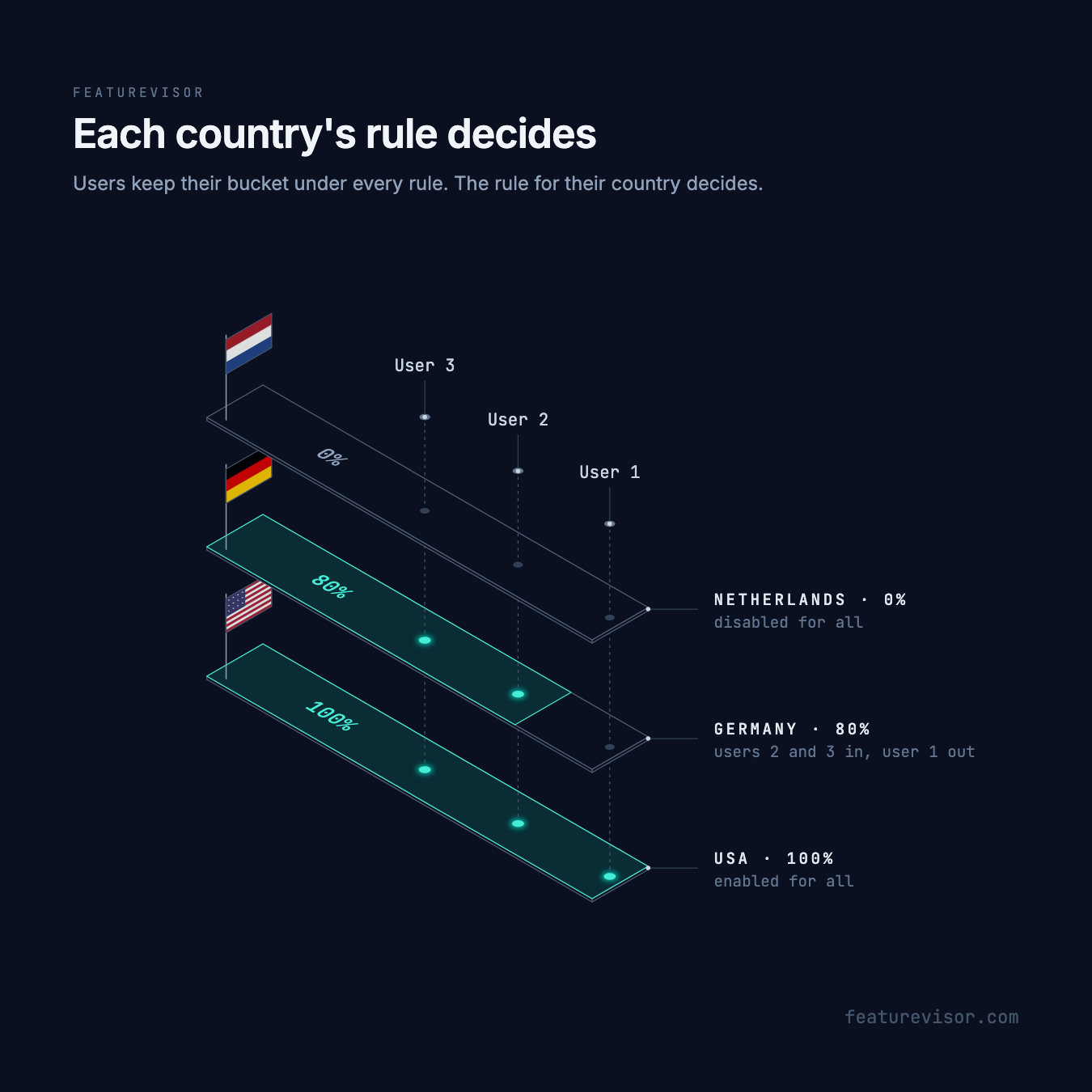
In the illustration, user-1, user-2 and user-3 keep the same position under every rule. Which rule matches them, and its percentage, decide whether they are in. For checkout, four users get these results:
| User | Country | Bucket | Rule | Enabled |
|---|---|---|---|---|
user-1 | de | 97.3 | germany | No |
user-2 | de | 73.5 | germany | Yes |
user-3 | nl | 49.3 | netherlands | No |
user-4 | us | 89.3 | usa | Yes |
user-2 is inside the first 80% in Germany, and user-1 is outside it. user-3 is off whatever their bucket, because the Netherlands is at 0%, and user-4 is on, because the USA is at 100%. A user outside the matching rule's percentage is off. They do not fall through to a later rule. A user in a country with no rule matches nothing and is off too.
Roll out gradually#
Raise a rule's percentage in small steps, each through a pull request. Here the Netherlands goes from 0% to 50%:
# ...rules: - key: netherlands conditions: netherlands percentage: 50 - key: germany conditions: - attribute: country operator: equals value: de percentage: 80 - key: usa conditions: - attribute: country operator: equals value: us percentage: 100Buckets do not move, so everyone already in stays in. At 50%, user-3 joins, since their bucket is 49.3. Lowering the percentage takes out the users above the new value. Keep the rule's key unchanged as you go. See Bucketing for how variations stay stable too.
Switch it off fast#
If something goes wrong, force the flag off for everyone. A force entry is checked before the rules, so they stay ready for when you switch it back on:
# ...force: - conditions: '*' enabled: false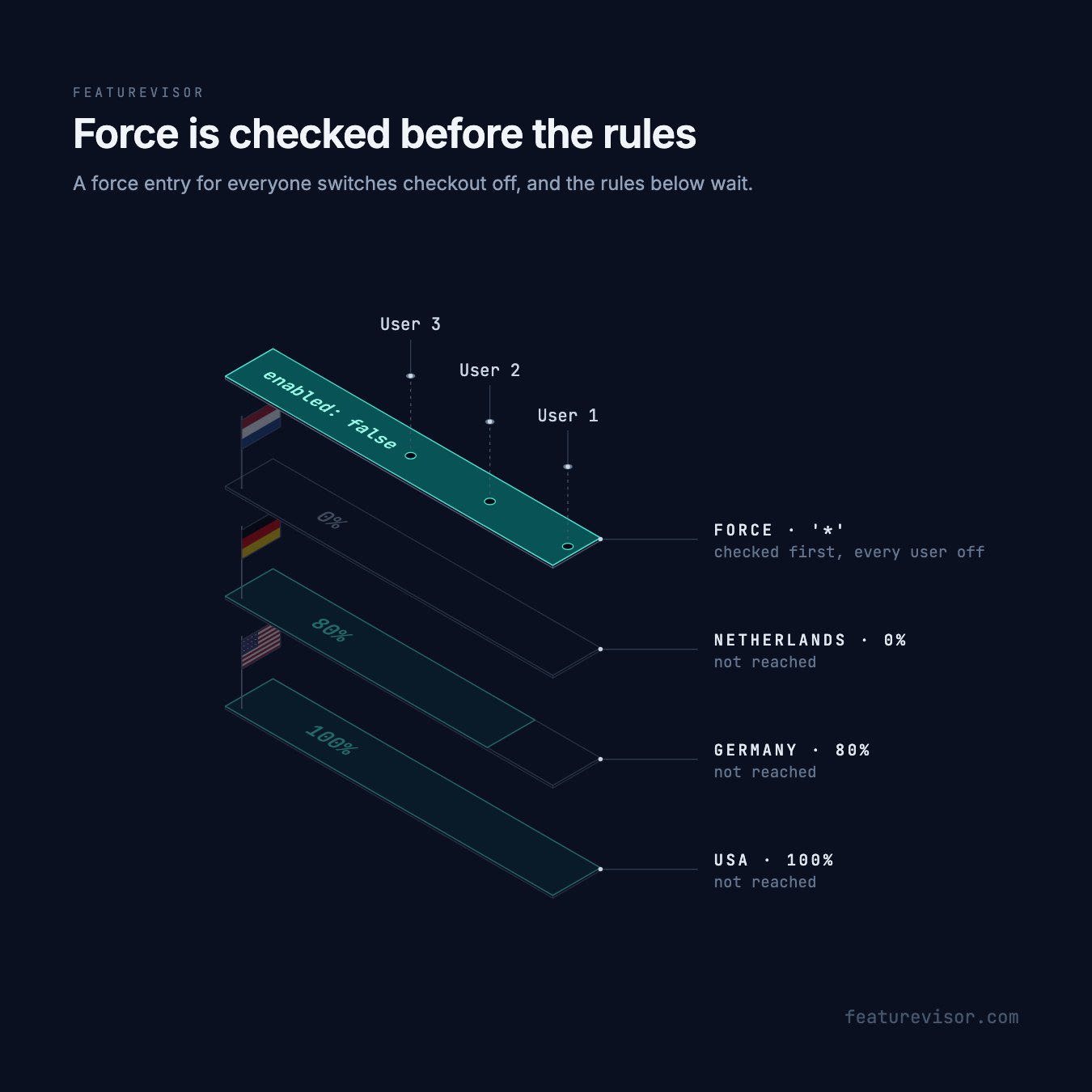
The change reaches users when their applications load the new datafile, so how quickly it takes effect depends on how often they refresh. Plan that interval with your engineers before you need it. See how applications get updates, and Kill switches for planning the whole incident.
To switch off one audience instead, set its rule's percentage to 0. Its users get false and do not fall through to the next rule.
Let someone in early#
Force the flag on for a tester, here user-1, who is outside the 80% in Germany:
# ...force: - conditions: - attribute: userId operator: equals value: 'user-1' enabled: trueThe first matching force entry wins, so put a kill switch for everyone above any entries like this one. Use a segment key in conditions to let a whole team in. See Testing in production.
Depend on another flag#
A feature can require another one to be enabled first, such as file upload in a live chat. See Conditions and the example in Features.
Test it#
A spec fixes the bucket with at, so it checks the rollout without real users:
feature: checkoutassertions: - description: Dutch users are out at: 90 context: country: nl expectedToBeEnabled: false - description: German users are in below 80 at: 10 context: country: de expectedToBeEnabled: true - description: German users are out above 80 at: 90 context: country: de expectedToBeEnabled: false - description: Users in the USA are always in at: 90 context: country: us expectedToBeEnabled: trueTo see why a real user got their result, add --explain to evaluate:
npx featurevisor evaluate \ --feature=checkout \ --context='{"userId":"user-1","country":"de"}' \ --explainUse it in your application#
Pass the attributes your rules and bucketBy use:
const context = { userId: 'user-2', country: 'de',}if (f.isEnabled('checkout', context)) { // show the new checkout}Always include userId. Without it, every context shares one bucket, so all anonymous visitors get the same answer together. For checkout, that bucket is 5.6, so every anonymous visitor in Germany or the USA is in. Use bucketBy: { or: [userId, deviceId] } for visitors who have not signed in. See the JavaScript SDK for evaluation details.
Retire it#
Once checkout is at 100% everywhere and the old code is gone, retire the flag:
- Set
deprecated: true. SDKs keep evaluating it and log a warning, so you can find remaining calls. - Check what still uses it with
npx featurevisor find-usage --feature=checkout. - Remove the calls from your applications, then set
archived: true. Linting stops you if another active definition, spec or target still refers to it. Keep the archived file, so the key is not reused.
See Deprecating and Archiving for the details.
Related#
- Features, for every field a feature takes
- Variations, to split the users a flag lets in
- Progressive delivery, a rollout from start to finish
- Deprecating features, retiring a flag across applications