


Definitions in depth
Variations
Variations split the users of a feature between alternatives, so you can run an experiment. This page follows one experiment, pricing, from its first split until you pick a winner.
Split users between variations#
Add variations to a feature, each with a value and a weight. This is the pricing experiment from How it works:
description: Pricing page experimentbucketBy: userIdvariations: - value: control weight: 50 - value: treatment weight: 50rules: - key: everyone conditions: '*' percentage: 100Each user's bucket decides their variation: the first 50 go to control and the rest to treatment. Four users get these:
| User | Bucket | Variation |
|---|---|---|
3f5d | 9.2 | control |
8f2a | 18.9 | control |
9b30 | 30.9 | control |
c4e1 | 70.0 | treatment |
Your application asks for the variation with getVariation:
const context = { userId: 'c4e1',}f.getVariation('pricing', context) // 'treatment'A disabled feature returns null. See the JavaScript SDK for more.
Featurevisor decides who sees which variation. Which one wins is measured in your analytics, so record each user's variation alongside the events you compare, as record who saw what shows.
Values and weights#
Each variation takes these fields:
| Field | Required | Description |
|---|---|---|
value | Yes | A unique string, such as control or treatment. |
weight | Yes | Its share of the rollout, from 0 to 100 with up to three decimal places. |
description | No | What this variation changes. |
variables | No | Values for the feature's variables. |
Add as many variations as you need, such as three at 33.333, 33.333 and 33.334. Make the weights total 100. Lint reports any other total with its actual sum, because a short split would build once and then fail every later build with Invalid saved variation allocation, once the state file had recorded it.
Change the rollout while it runs#
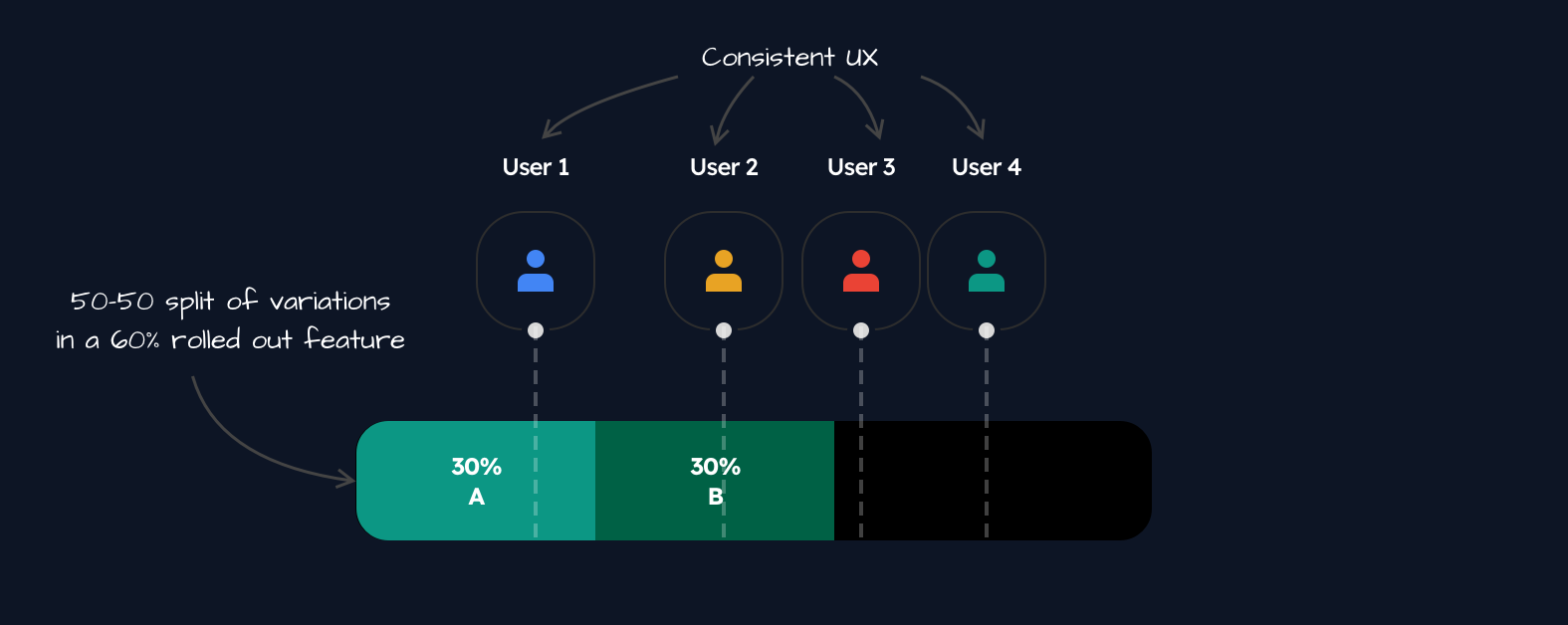
Suppose pricing had started at 60% of users instead, still split 50/50:
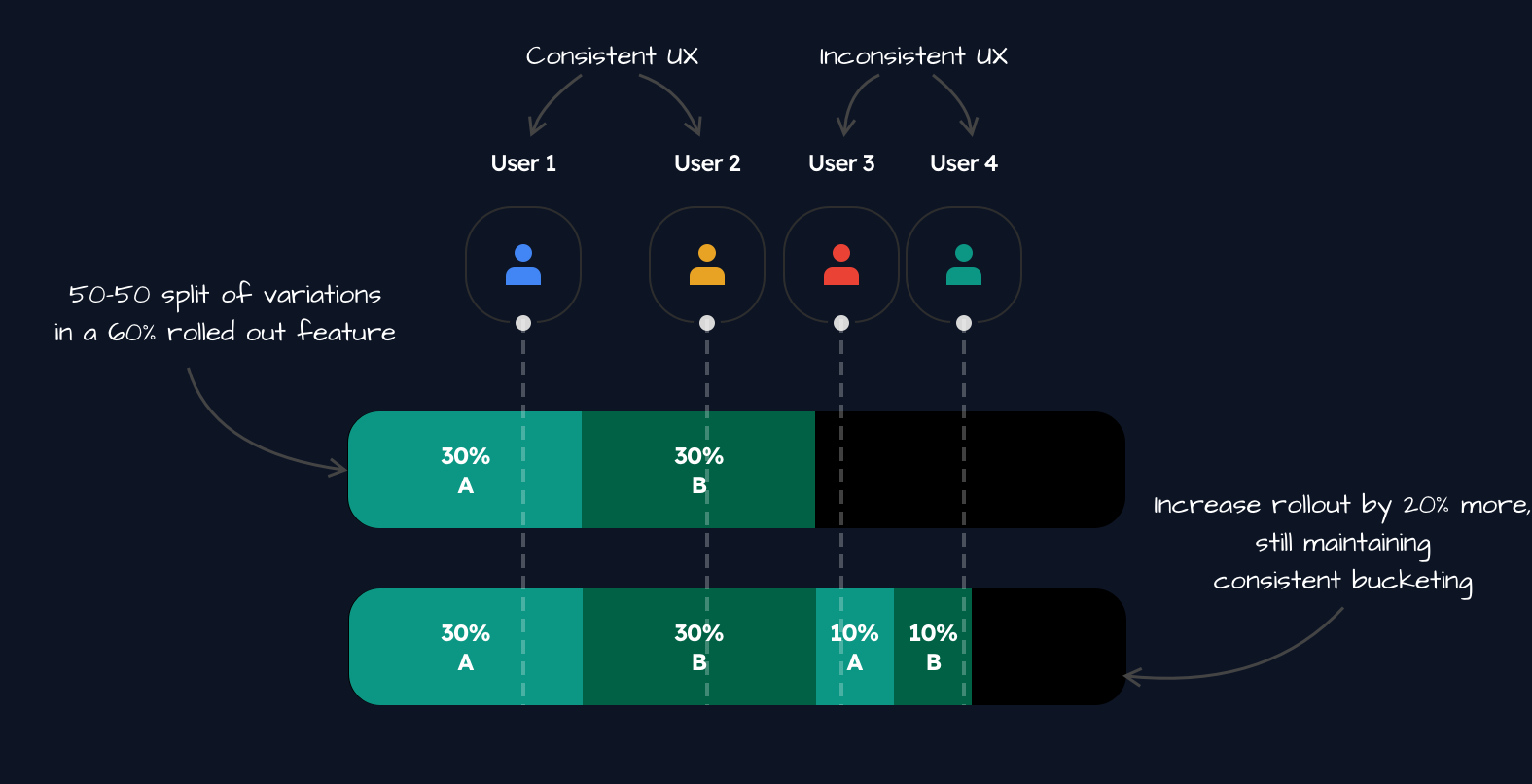
# ...rules: - key: everyone conditions: '*' percentage: 60The 60% is divided between the variations, so control gets buckets 0 to 30 and treatment 30 to 60. The illustrations call them A and B. Users 3 and 4 are outside the rollout:
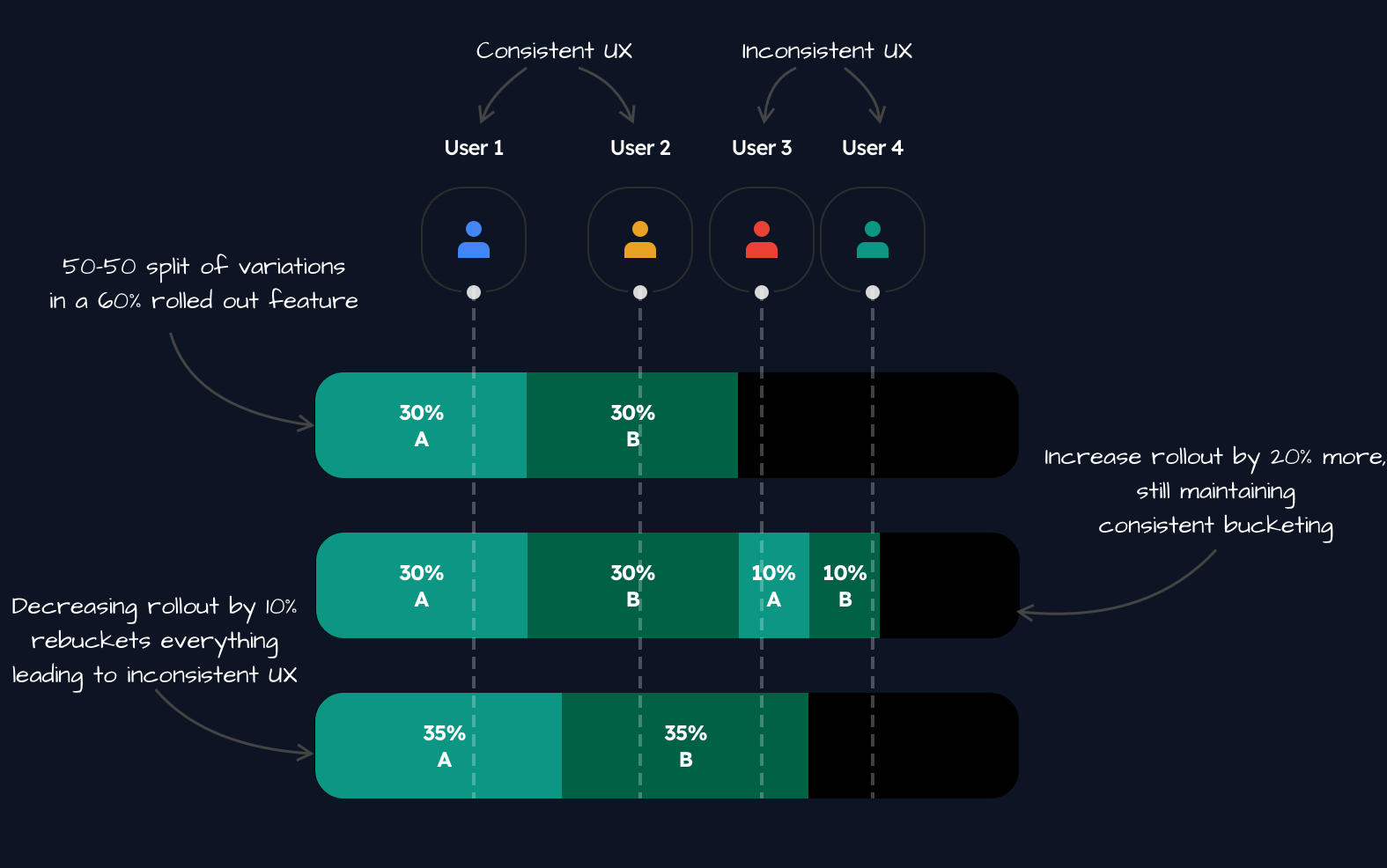
Raise it to 80%. Featurevisor keeps the existing ranges and divides only the new 20% between the variations. Users 1 and 2 keep their variations, and users 3 and 4 join:
Lower it to 70%. Featurevisor now divides the whole 70% again, as control 0 to 35 and treatment 35 to 70. User 3 moves from A to B, and user 4 drops out:
Raise it to 100% from there. Only the new 30% is divided, so everyone already in keeps their variation:
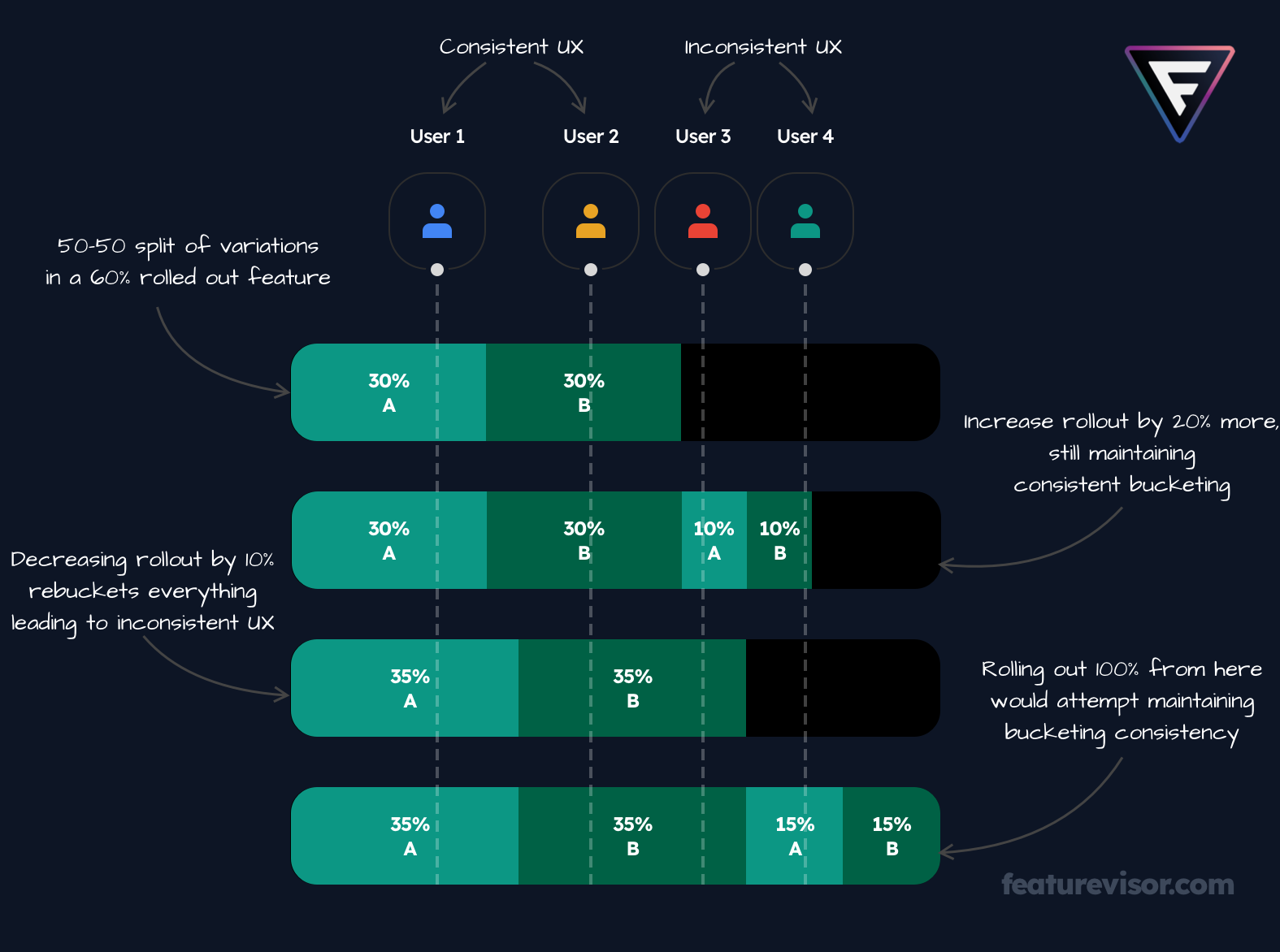
The split now depends on that history. After it, buckets 70 to 85 belong to control, so c4e1 at 70.0 is in control, not the treatment it gets when pricing starts at 100%.
To keep variations stable:
- raise the percentage, and avoid lowering it while the experiment runs
- keep the rule's
keyunchanged - commit the state files, which record each rule's allocation between builds
Fix a variation for an audience#
Set variation on a rule to give everyone it matches the same variation. Dutch users always see control, while the experiment runs for everyone else:
# ...rules: - key: netherlands conditions: netherlands percentage: 100 variation: control - key: everyone conditions: '*' percentage: 100c4e1 gets control in the Netherlands and treatment elsewhere.
Different weights for one rule#
Set variationWeights to split one rule differently from the feature's weights:
# ...rules: - key: everyone conditions: '*' percentage: 100 variationWeights: control: 70 treatment: 30A rule with variationWeights is divided again on every build. Raising its percentage then moves users between variations too, not only lowering it. Keep its percentage fixed while the experiment runs.
While the feature is disabled#
A disabled feature returns null for its variation. Set disabledVariationValue to return a fallback instead:
# ...disabledVariationValue: controlWhen the feature declares variations, the fallback must be one of their values. You can also set disabledVariationValue without declaring a variations list.
Give each variation its own values#
A variation can set the feature's variables, so each one changes copy, colours or limits as well as the code path. The buyButton feature in Variables shows how.
Test it#
A spec fixes the bucket with at and checks the variation:
feature: pricingassertions: - description: Low buckets get control at: 10 expectedToBeEnabled: true expectedVariation: control - description: High buckets get treatment at: 90 expectedToBeEnabled: true expectedVariation: treatmentTo see why a real user got their variation, add --explain to evaluate:
npx featurevisor evaluate \ --feature=pricing \ --context='{"userId":"c4e1"}' \ --explainEnd the experiment#
Once you know which variation wins, send everyone to it. Changing the weights reassigns users, which is what you want now:
# ...variations: - value: control weight: 0 - value: treatment weight: 100After the next build, every user gets treatment. When the old code path is gone, remove the variations and retire the flag as Flags describes.
Related#
- Bucketing, for how allocations stay stable
- A/B tests and multivariate experiments
- Mutually exclusive experiments and holdouts