


Define your configuration
Targets
A target decides what goes into one datafile. Give each application its own target, so it loads only the features and global variables it uses.
Start with one datafile#
The scaffold from the Quick start comes with one target:
description: All features and global variablesA target with no selectors includes every feature and global variable that is not archived. Building writes one datafile per target, named after its file:
datafiles/featurevisor-all.jsonWith environments, each environment gets its own copy, such as datafiles/production/featurevisor-all.json. A target in a subdirectory keeps it, so targets/apps/admin.yml builds datafiles/apps/featurevisor-admin.json.
One datafile per application#
Most projects serve more than one application. The cookie banner from the scaffold only makes sense on the web, so the mobile apps do not need it. Tags let each target pick what its application uses. Declare them in your configuration, keeping any other settings you have:
module.exports = { tags: ['web', 'mobile'],}Tag each feature and global variable with the applications that read it:
# ...tags: - web - mobile# ...tags: - web - mobileGive showCookieBanner only the web tag. Then add a target for each application:
description: Web apptag: webdescription: Mobile appstag: mobileEach datafile now holds what its application needs:
| Datafile | Features | Global variables |
|---|---|---|
featurevisor-web.json | checkout, showCookieBanner | supportEmail |
featurevisor-mobile.json | checkout | supportEmail |
Tag global variables too
A tag selector applies to global variables as well as features. An untagged global variable is left out of every target that selects by tag.
Use tags in place of tag to combine several with and or or. See Tags for every form.
Each application now downloads less, and a browser or phone receives only the definitions its application uses. Everything it does receive is public, and dependencies come along whatever their tags, so a target is not a way to keep a launch secret.
Narrow by key#
Tags suit applications. Key patterns suit a service that needs only a few definitions. This target is for a checkout service:
description: Checkout serviceincludeFeatures: - checkoutincludeVariables: - support** matches any characters, so support* matches supportEmail. Features and global variables are selected separately:
| Selector | Selects |
|---|---|
includeFeatures, excludeFeatures | Features by key. Global variables are unaffected. |
includeVariables, excludeVariables | Global variables by key. Features are unaffected. |
tag or tags | Features and global variables that carry the tags. |
When a target has several selectors, a definition must match all of them. Exclusions win over inclusions. '*' stands for every key. To leave one kind out entirely, exclude all of it:
description: Checkout flags onlyincludeFeatures: - checkoutexcludeVariables: '*'A pattern cannot be empty, have spaces around it or use **.
What comes along#
Selectors choose where a datafile starts. Featurevisor then adds whatever is needed to evaluate those definitions correctly:
- features they reference in conditions, and their dependencies
- global variables they check with
conditions, with their own dependencies - the feature that owns a feature variable they check
- every source read by a composed variable, including nested compositions and source dependencies
- every segment used in gates, rules, force entries or overrides, including its segment, feature and variable references
So a target that includes only chatFileUpload from Features also gets liveChat. These are added even when selectors or tags would leave them out, and every branch of an and, or or not condition counts, including references through other segments. The one exception is a feature with expose: false, which stays out, so do not hide a feature that others require.
Selecting checkoutView brings along checkout, pricing, buyButton and supportEmail even if their tags differ or selectors exclude them. Sources include whole feature definitions, not only the referenced field. Target filtering is not a confidentiality boundary.
For a selected composition, expose: false and archiving still win. A missing, hidden or archived source fails the build rather than producing an incomplete composition. Check the composition, Target, environment and source named in the build error. Nested source dependencies follow the same closure.
Apply known context#
When every user of a datafile shares some context, such as their country, give it to the target. The build resolves what that context already decides, and the datafile gets smaller. This target is for the Dutch web storefront:
description: Dutch web storefronttag: webcontext: country: nl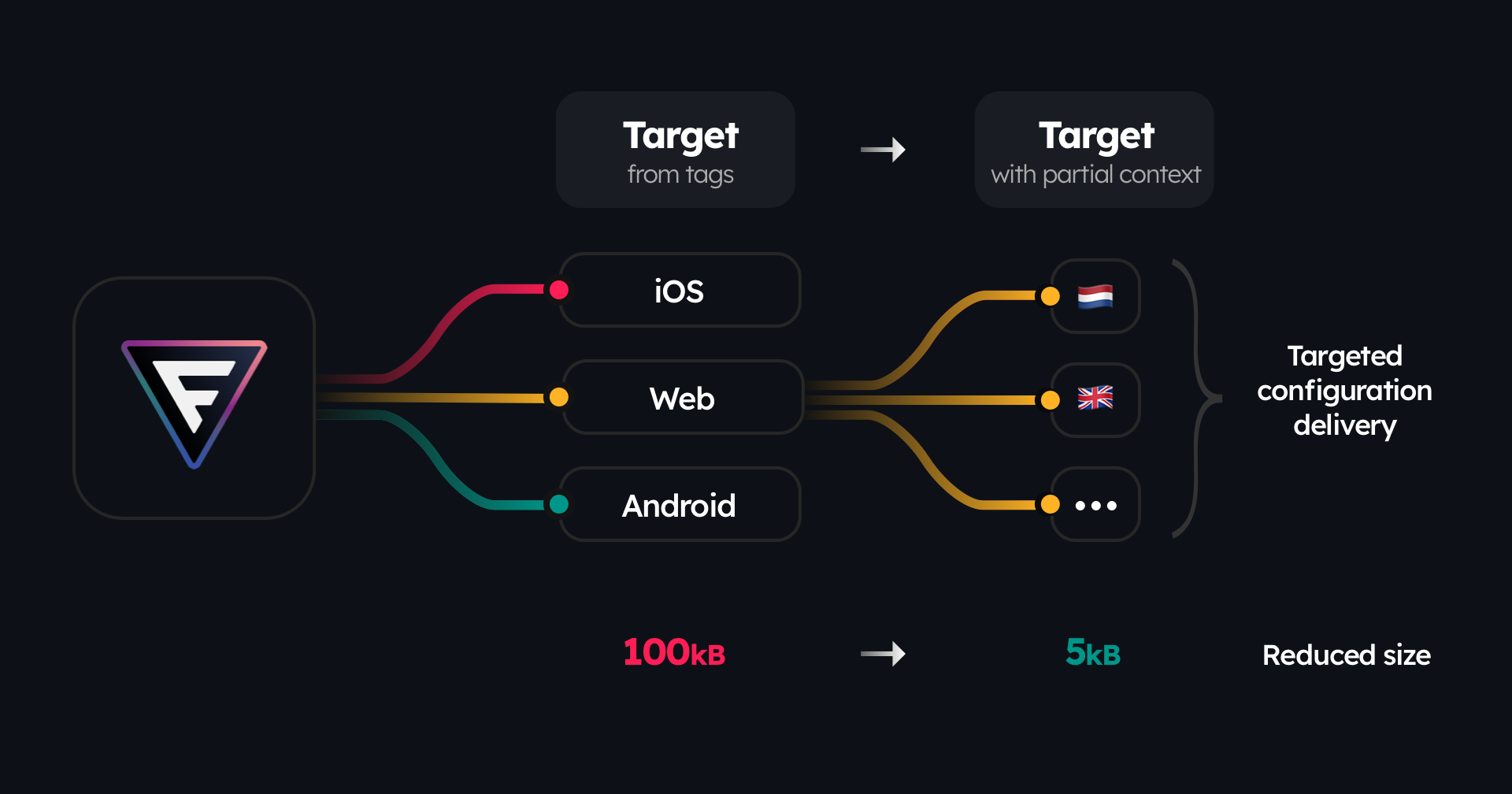
The illustration shows the idea: a target per application, then a smaller one per country within an application. For this project, the web datafiles compare like this:
featurevisor-web.json | featurevisor-web-nl.json | |
|---|---|---|
| Segments | netherlands | None |
checkout rules | netherlands at 100%, everyone at 25% | One rule for everyone at 100% |
supportEmail | An override for netherlands | The override applies to everyone |
| Size | 767 bytes | 530 bytes |
Serve this datafile only to Dutch users. Its results assume country: nl, so a German user evaluated against it gets the Dutch support address and is always in checkout. Context keys are not checked against your attributes, so match their names exactly.
Load the right datafile#
Each application fetches its own datafile, such as featurevisor-web.json, from wherever you publish them. See Deployment and the Quick start for the fetch.
Test and inspect#
A feature spec can evaluate against one target's datafile. The test runner builds it in memory:
feature: checkoutassertions: - description: Dutch web users are in target: web at: 90 context: country: nl expectedToBeEnabled: trueIf your project configures environments, also set environment on the assertion.
Commands that build, test or evaluate take --target, as often as you need:
npx featurevisor build --target=web --target=mobilenpx featurevisor test --target=webnpx featurevisor evaluate \ --target=web \ --feature=checkout \ --context='{"userId":"user-5","country":"de"}'benchmark, assess-distribution, list and info take it too. Each selected target is processed on its own. Without --target, commands work on the whole project. build --json and build --print accept at most one target.
Promotable#
In a project that uses sets, a target can protect its existing destination definition from later promotions by setting promotable: false at the top level:
description: Production web datafilepromotable: falsetag: webincludeFeatures: - checkout*If the destination target exists, it remains unchanged when either the source or destination target has this field. A missing destination target is still created and retains promotable: false.
When promote --target=web is used, the source target selects the initial features and is included in the promotion. A protected existing destination target is preserved, but feature selection still comes from the source target used by the command.
Related#
- Tags, for every form of
tags - Building datafiles
- Deployment, for publishing each datafile
- Loading datafiles on demand