


Use cases
Role based access control (RBAC)
Show each user the features their roles allow. Role rules live in one place in Git, instead of in role checks scattered through the interface, while your backend keeps deciding who has which role and what they may do.
Who owns what#
Keep these responsibilities separate:
| Concern | Owner |
|---|---|
| Authenticating the user | Backend |
| Determining which roles the user has | Backend |
| Communicating roles to the client | Backend (via API response / JWT) |
| Declaring which features require which roles | Featurevisor project (Git) |
| Evaluating feature visibility at runtime | Featurevisor SDK (client) |
| Enforcing access on sensitive operations | Backend (always) |
You can also evaluate these definitions in a backend service. A frontend visibility check never replaces authorization on a protected operation.
How it works#
An attribute of type array holds a list of strings, which suits roles, since a user can have several. The pattern has three parts:
- A
rolesattribute, holding the current user's roles - One segment per role, matching users whose
rolesinclude it - Feature rules that name those segments
The application passes the roles it gets from the backend into the SDK's context, and the SDK evaluates the rules with them.
Define the roles attribute#
description: Roles of the signed in user, from the backendtype: arrayitems: type: string enum: - viewer - editor - manager - admin - super-adminThe items and enum properties document allowed values and support linting. They do not reject additional roles in runtime context or replace the backend's validation of role assignments.
A segment for each role#
Each segment answers one question: does this user have this role?
description: Users who have the super-admin roleconditions: - attribute: roles operator: includes value: super-admindescription: Users who have the admin roleconditions: - attribute: roles operator: includes value: admindescription: Users who have the manager roleconditions: - attribute: roles operator: includes value: managerdescription: Users who have the editor roleconditions: - attribute: roles operator: includes value: editordescription: Users who have the viewer roleconditions: - attribute: roles operator: includes value: viewerEvery feature that depends on a role reuses its segment, so letting another role see a feature is a one line change.
Show features by role#
Define features that target those segments.
List the roles that grant access. A not rule also matches users without roles, including signed-out visitors.
The default scaffold already declares userId, country and the netherlands segment used below. Roles do not imply a hierarchy: list each role that grants the feature.
Admins only#
description: | Advanced settings panel visible only to admins and super adminsbucketBy: userIdrules: - key: admins conditions: or: - admins - superAdmins percentage: 100 - key: everyone-else conditions: '*' percentage: 0Managers and above#
description: | Billing dashboard visible to managers, admins and super adminsbucketBy: userIdrules: - key: billing_roles conditions: or: - managers - admins - superAdmins percentage: 100 - key: everyone-else conditions: '*' percentage: 0Editors and above#
description: | Bulk data export available to editors and abovebucketBy: userIdrules: - key: contributors conditions: or: - editors - managers - admins - superAdmins percentage: 100 - key: everyone-else conditions: '*' percentage: 0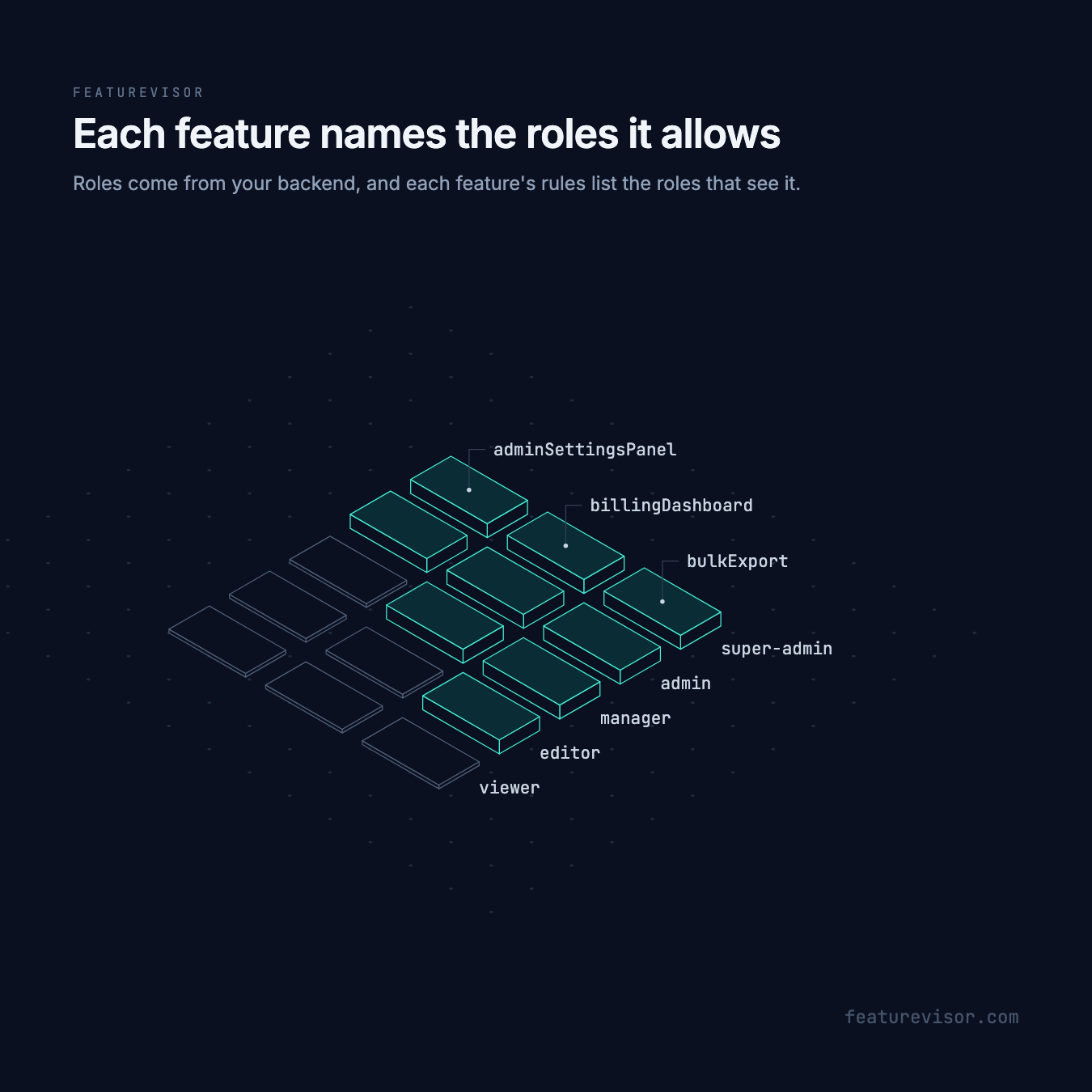
Roles with other segments#
Combine a role with other segments. Here, a new analytics feature is rolled out to managers in the Netherlands first:
description: | Advanced analytics gradual rollout starting with managers in the NetherlandsbucketBy: userIdrules: - key: nl-managers-early-access conditions: and: - managers - netherlands percentage: 100 - key: everyone-else conditions: '*' percentage: 0Pass the roles as context#
The backend provides the roles for the current user, and application code passes them into the SDK context in runtime:
import { createFeaturevisor } from '@featurevisor/sdk'const DATAFILE_URL = 'https://cdn.yoursite.com/featurevisor-all.json'const sessionResponse = await fetch('/api/me')if (!sessionResponse.ok) throw new Error('Could not load the current session')const session = await sessionResponse.json()const response = await fetch(DATAFILE_URL)if (!response.ok) throw new Error(`HTTP ${response.status}`)const datafileContent = await response.json()const f = createFeaturevisor({ context: { userId: session.userId, roles: Array.isArray(session.roles) ? session.roles : [], country: session.country, }, datafile: datafileContent,})This instance belongs to one browser session. Replace its context when the user changes or logs out. Do not retain the previous user's roles. On a shared server instance, pass trusted context to each evaluation instead of setting user context on the instance. Learn how to build datafiles.
Evaluate the features#
Use the SDK instance to evaluate feature visibility:
const showAdminSettings = f.isEnabled('adminSettingsPanel')const showBilling = f.isEnabled('billingDashboard')const showBulkExport = f.isEnabled('bulkExport')const showAnalytics = f.isEnabled('advancedAnalytics')Every SDK evaluates the same definitions, so a backend in Go or Python can make the same decision.
Test role access#
Verify both absent roles and overlapping assignments. A viewer who is also an editor has a contributing role, while a viewer alone does not.
feature: bulkExportassertions: - description: Signed out without roles at: 50 context: {} expectedToBeEnabled: false - description: Null roles at: 50 context: { roles: null } expectedToBeEnabled: false - description: Empty roles at: 50 context: { roles: [] } expectedToBeEnabled: false - description: Viewer alone at: 50 context: { roles: [viewer] } expectedToBeEnabled: false - description: Editor at: 50 context: { roles: [editor] } expectedToBeEnabled: true - description: Viewer and editor at: 50 context: { roles: [viewer, editor] } expectedToBeEnabled: true - description: Manager at: 50 context: { roles: [manager] } expectedToBeEnabled: true - description: Admin at: 50 context: { roles: [admin] } expectedToBeEnabled: true - description: Super admin at: 50 context: { roles: [super-admin] } expectedToBeEnabled: trueRun npx featurevisor lint, npx featurevisor test and npx featurevisor build from your initialized project.
Related#
- Entitlements, for what each plan includes
- Combining segments
- Array attributes