


Advanced
Reusable schemas for variables
Define schemas once and reuse them when defining multiple variables spanning across multiple features.
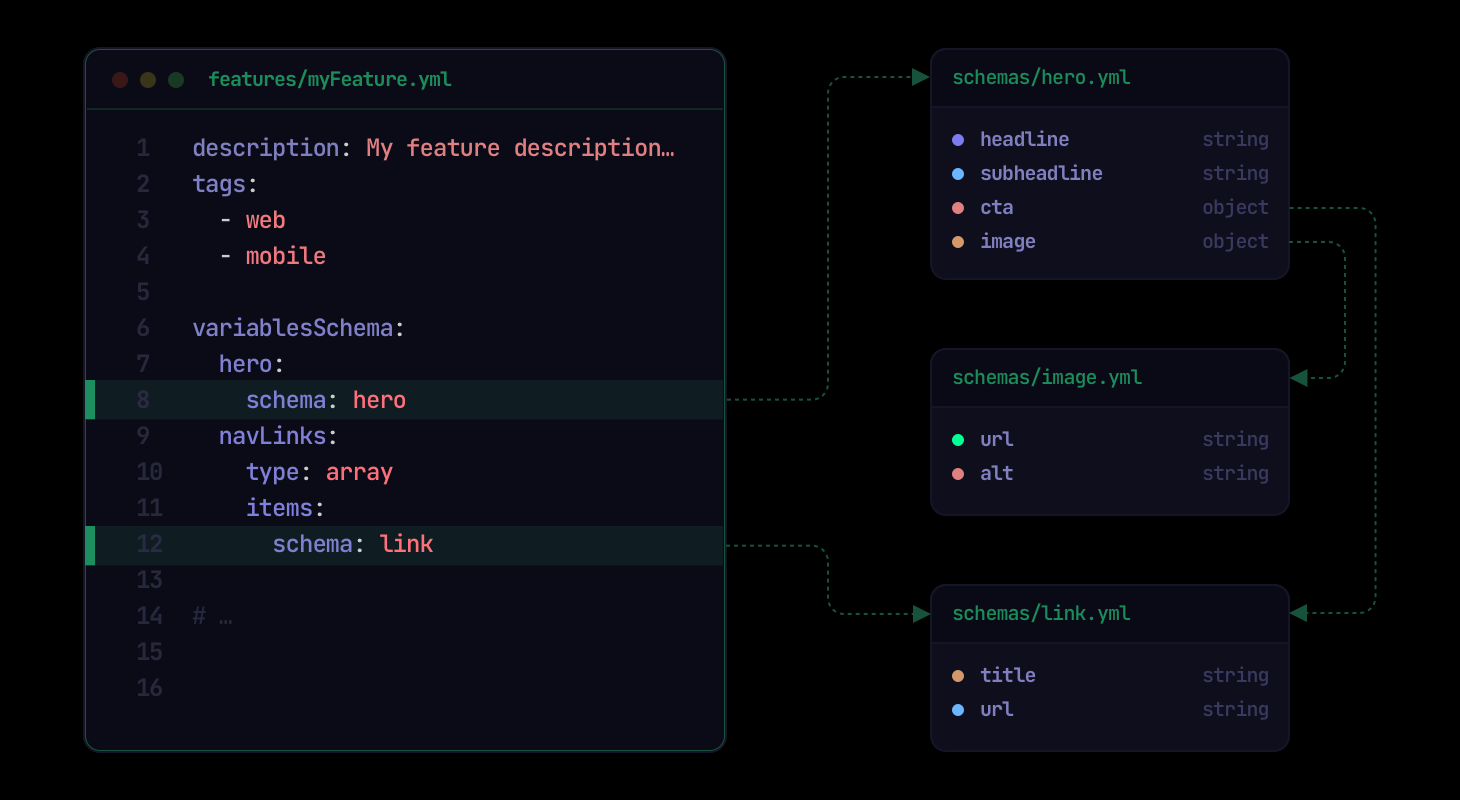
Understanding variable schemas#
Each feature in Featurevisor can optionally define its variables using the variablesSchema property, which is a dictionary of variable names to their individual variable schemas.
A simple string variable schema would look like this inside a feature:
# ...variablesSchema: my_variable: type: string defaultValue: redSeveral other types of variables supported include:
boolean: eithertrueorfalseinteger: any integer valuedouble: any floating point number valuearrayobjectjson: free-form stringified JSON
Read further in the variables section for more documentation.
Complex variable schemas#
When object or array types are used, we can define the schema directly inline.
This follows a flavour of JSON Schema format, but in a highly simplified form.
Object variable#
Objects can be defined as flat or nested depending on the requirements:
# ...variablesSchema: hero: type: object properties: title: type: string subtitle: type: string cta: type: object properties: text: type: string url: type: string defaultValue: title: Welcome subtitle: Welcome to our website cta: text: Get started url: /get-startedArray variable#
Arrays can be defined as simple arrays of strings, numeric values, or even objects:
# ...variablesSchema: navLinks: type: array items: type: object properties: title: type: string url: type: string defaultValue: - title: Home url: / - title: About url: /about - title: Contact url: /contactDefining reusable schemas#
Instead of having to inline the schema in each feature, we can extract them to a separate file and reference them by name.
We can first create a reusable schema for links:
description: Individual link schematype: objectproperties: title: type: string url: type: stringrequired: - title - urlNow we can create another schema for hero:
description: Hero schematype: objectproperties: title: type: string subtitle: type: string cta: schema: link # schemas can reference other schemasReferencing schemas#
Now from inside our feature, we can reference the reusable schemas by name when defining the variables:
# ...variablesSchema: hero: schema: hero # reference by schema name defaultValue: title: Welcome subtitle: Welcome to our website cta: title: Get started navLinks: type: array items: schema: link # we can reference at item level too in arrays defaultValue: - title: Home url: / - title: About url: /about - title: Contact url: /contactAlternatively, we could also define links as a reusable schema for an array of links:
description: List of links schematype: arrayitems: schema: link # plural "links" referencing singular "link"And then reference it directly in our feature:
# ...variablesSchema: navLinks: schema: links defaultValue: - title: Home url: / - title: About url: /about - title: Contact url: /contactAdvanced usage#
properties#
The properties property is used to define the properties that are allowed in the schema:
description: Schema description...type: objectproperties: name: type: stringadditionalProperties#
For type object, we can use additionalProperties to allow any string key while enforcing one schema for all dynamic values:
description: Dynamic labelstype: objectadditionalProperties: type: stringadditionalProperties can also reference another reusable schema:
description: Links indexed by localetype: objectadditionalProperties: schema: linkIt can also be combined with fixed properties:
description: Hero with flexible metadatatype: objectproperties: title: type: stringadditionalProperties: type: stringrequired: - titlerequired#
The required property is used to define the properties that are required in the schema:
description: Schema description...type: objectproperties: name: type: stringrequired: - nameconst#
We can use the const property to define a constant value for a particular property in the schema:
description: Schema description...type: stringconst: "constant value here"enum#
We can use the enum property to define a list of allowed values for a particular property in the schema:
description: Schema description...type: stringenum: - value1 - value2 - value3minimum#
For numeric types (integer or double), we can use the minimum property to define the minimum value for the schema:
description: Schema description...type: integerminimum: 0maximum#
For numeric types (integer or double), we can use the maximum property to define the maximum value for the schema:
description: Schema description...type: integermaximum: 100Both minimum and maximum properties can be used together to define a range of allowed values:
description: Schema description...type: integerminimum: 0maximum: 100minLength#
For type string, we can use minLength to require a minimum character length:
description: Schema description...type: stringminLength: 1maxLength#
For type string, we can use maxLength to allow a maximum character length:
description: Schema description...type: stringmaxLength: 100Both minLength and maxLength can be used together:
description: Schema description...type: stringminLength: 1maxLength: 100pattern#
For type string, we can use pattern to require the value to match an ECMA-262 regular expression:
description: Schema description...type: stringpattern: "^[a-z0-9-]+$"We can also combine pattern with minLength and maxLength:
description: Schema description...type: stringminLength: 3maxLength: 20pattern: "^[a-zA-Z0-9_]+$"minItems#
For type array, we can use minItems to require a minimum number of elements:
description: Schema description...type: arrayminItems: 1items: type: stringmaxItems#
For type array, we can use maxItems to allow a maximum number of elements:
description: Schema description...type: arraymaxItems: 10items: type: stringBoth minItems and maxItems can be used together:
description: Schema description...type: arrayminItems: 1maxItems: 10items: type: stringuniqueItems#
For type array, we can use uniqueItems to require that all elements are unique (no duplicates).
description: Schema description...type: arrayuniqueItems: trueitems: type: stringoneOf#
We can use the oneOf property to allow a value to match exactly one of several schemas.
One of the primitive types:
description: Value is either a string or an integeroneOf: - type: string - type: integerMixing with other schemas:
description: Either a string id or a full link objectoneOf: - type: string - schema: link # reference another schema by nameFor array items, we can use items property to reference the oneOf schema:
description: Mixed list of strings and integerstype: array# by referencing schema that already uses `oneOf` internallyitems: schema: stringOrNumber# or by defining `oneOf` directly:items: oneOf: - type: string - type: integer - schema: link # reference another schema by name - schema: someOtherSchemaPromotable#
In a project that uses sets, a reusable schema can protect its existing destination definition from later promotions by setting promotable: false at the top level:
description: Linkpromotable: falsetype: objectproperties: title: type: string url: type: stringIf the destination schema exists, it remains unchanged when either the source or destination schema has this field. A missing destination schema is still created and retains promotable: false.
Promotion protection applies to the reusable schema file as a whole. Do not place promotable inside properties, items, oneOf, or other nested schema values to protect only part of a schema.
Linting based on schemas#
Because of strict linting that's supported out of the box in Featurevisor, we can find issues early if we mistakenly provided any wrong value for the variables anywhere in our feature definitions:
$ npx featurevisor lintLearn more in Linting page.
Code generation#
Even with the usage of reusable schemas, code generation takes care of generating types for the features and its variables out of the box for optionally added safety and improved developer experience.