


Reusable schemas
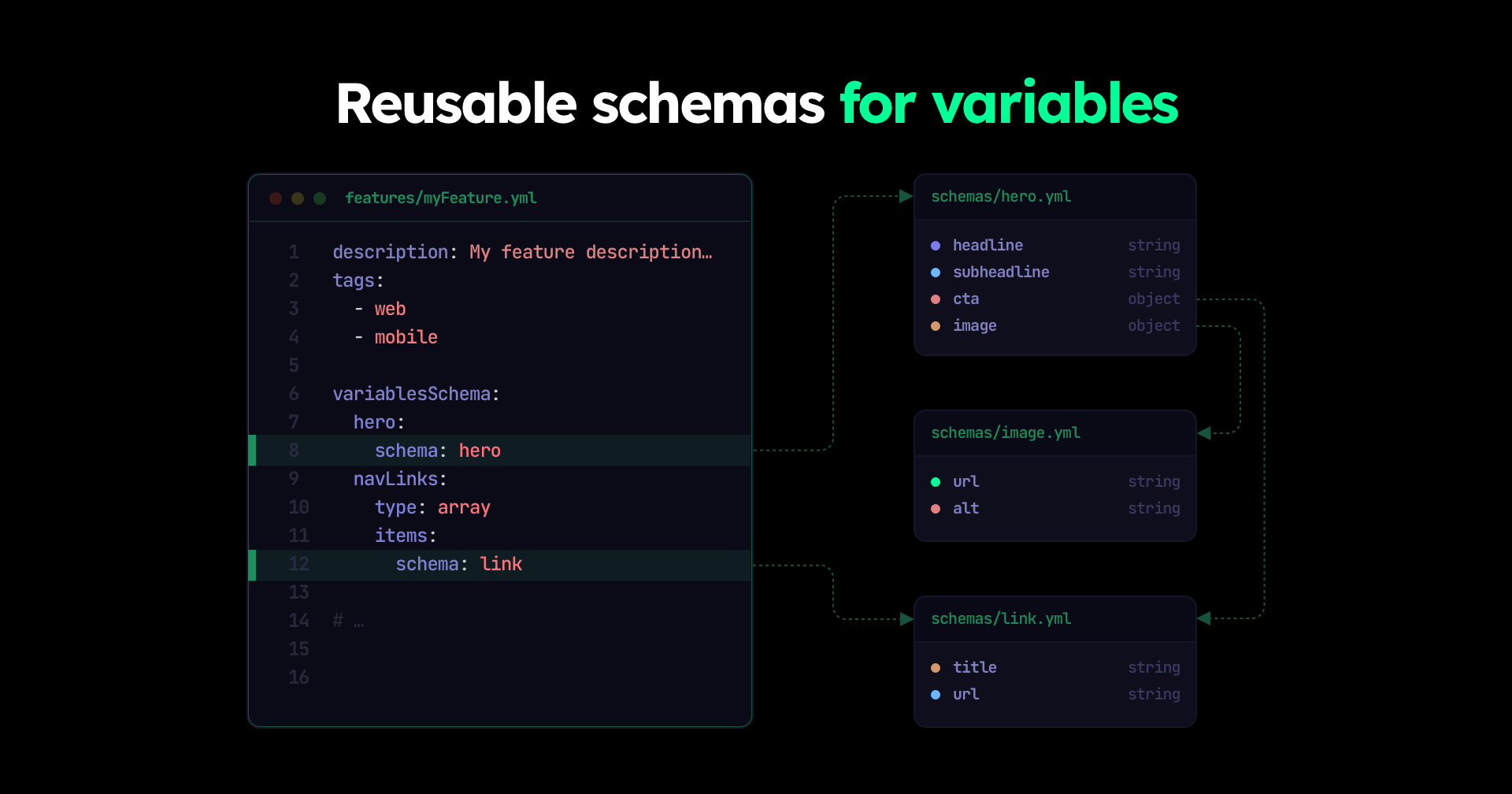
Recently, Featurevisor introduced more complex data structures in variables supporting nested objects, and also arrays of objects with full type safety.
Now those schemas (optionally) can be defined once separately, and referenced from anywhere by name.
TL;DR: read full API for reusable schemas here.
How variables are defined today#
Each feature maintains its own variables' schema definitions.
The types of variables supported today include:
stringbooleanintegerdoublearrayobjectjson(any valid JSON in stringified form)
Here's a simple example of a string variable
# ...variablesSchema: my_variable: type: string defaultValue: redVariables may also be complex data structures in the form of:
Here's an example of a nested object variable:
# ...variablesSchema: my_nested_object_variable: type: object properties: my_property: type: string another_property: type: object properties: another_nested_property: type: string required: - my_property - another_property defaultValue: my_property: my value another_property: another_nested_property: nested valueChallenges with current approach#
When your application configuration grows, you may find yourself repeating the same schema definitions across multiple features, and also across multiple variables.
This also means your individual feature definitions become harder to read and maintain as they grow longer and longer.
Solution: reusable schemas#
Instead of having to inline the schema in each feature, we can optionally choose to extract them to separate files and reference them by name.
First we create a schema in schemas directory, following a simplified flavour of JSON Schema:
description: My schematype: objectproperties: my_property: type: string another_property: type: object properties: another_nested_property: type: stringrequired: - my_property - another_propertyAnd then we can reference it from any feature:
# ...variablesSchema: my_nested_object_variable: schema: my_schema defaultValue: my_property: my value another_property: another_nested_property: nested valueAdvanced usage#
Several other JSON Schema inspired properties are supported, including:
| Property | Applies to | Description |
|---|---|---|
required | object | Define the properties that are required in the schema |
minimum | integer, double | Define the minimum value for a particular property in the schema |
maximum | integer, double | Define the maximum value for a particular property in the schema |
minLength | string | Define the minimum length of a string |
maxLength | string | Define the maximum length of a string |
pattern | string | Define a regular expression pattern that the string value must match |
minItems | array | Define the minimum number of items in an array |
maxItems | array | Define the maximum number of items in an array |
uniqueItems | array | Require that all items in an array are unique (no duplicates) |
const | any | Define a constant value for a particular property in the schema |
enum | any | Define a list of allowed values for a particular property in the schema |
oneOf | any | Allow a value to match exactly one of several schemas |
Learn more here.
Full linting support#
As complexity grows, and you define the schemas more precisely, Featurevisor's linting will help you find issues early if you mistakenly provided any wrong value for the variables anywhere in your feature definitions.
$ npx featurevisor lintLooking forward#
All of this paves the way for more complex variable definitions with full type safety and code generation.
More advanced use cases utilizing these new functionalities are coming soon as guides.
Fun fact: if I didn't build Eventvisor last summer, I probably wouldn't think of bringing schemas into Featurevisor like how it's done here now.