


Condition expressions: conditions you can read
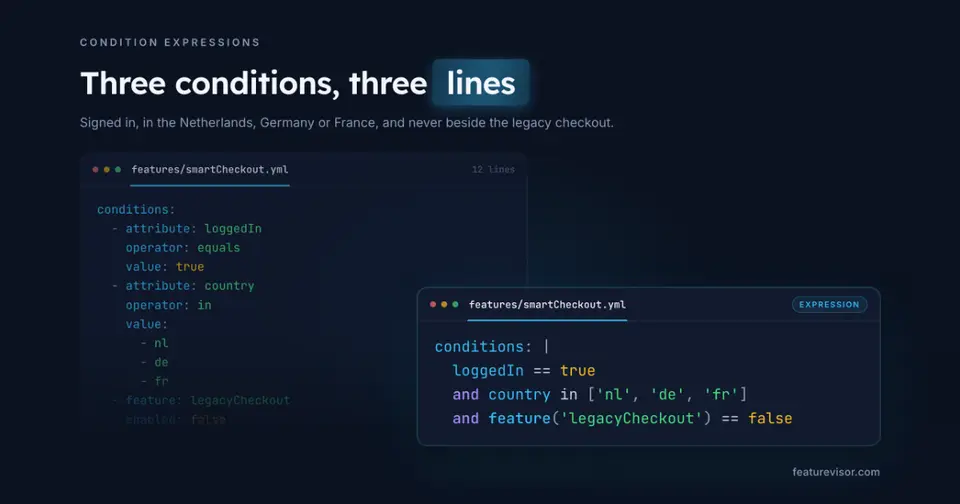
Featurevisor conditions can now be written as expressions, such as country == 'nl' and plan == 'paid'. The CLI turns each expression into the tree it always built, so your datafiles and SDKs stay exactly as they are.
Why text#
Conditions have always been YAML trees. Every part is named, so a tree is hard to misread and easy for tools to work with. But a rule with three conditions takes a dozen lines, and reviewing one in a pull request means reading attribute, operator and value over and over.
Here is a rule that rolls checkout out to Dutch accounts that pay, or that have 50 seats or more:
# ...rules: - key: netherlands conditions: - netherlands - or: - payingAccounts - attribute: account.seats operator: greaterThanOrEquals value: 50 percentage: 100The same rule, with its conditions as an expression:
# ...rules: - key: netherlands conditions: | netherlands and ( payingAccounts or account.seats >= 50 ) percentage: 100A name on its own is a segment, a name followed by an operator is an attribute, and feature('liveChat') and variable('maintenanceMode') read other features and global variables. All 32 operators are there, with symbols for comparisons and their own names for the rest, such as plan in ['paid', 'enterprise'].
Turn them on#
Expressions are off unless a project's configuration allows them:
module.exports = { conditionExpressions: true,}From then on, any string in conditions can be an expression: a whole value, an item in a list, or a child of and, or and not. Trees keep working beside them, so you can start with one rule.
Move a whole project, and back#
To try them across a project, let convert do it:
npx featurevisor convert --to=expressionsIt previews first. It writes every condition tree as an expression, turns the option on, and checks a converted copy of your project before touching anything: lint passes, tests pass, and every datafile evaluates the same.
Add --apply once the preview looks right:
npx featurevisor convert --to=expressions --applyconvert also writes each condition in its simplest form, conditions: age >= 18 rather than a list around it, and joins expressions that sit side by side. The datafiles change shape, but every SDK evaluates them the same, and the check proves it. For conditions written later, fmt --simplify does the same tidying on its own.
Changed your mind? --to=trees writes every expression back as the tree it builds, with the same checks, and turns the option off again:
npx featurevisor convert --to=treesComment lines move with the conditions they describe, both ways.
Mistakes at the line and column#
Lint reads each expression where you wrote it. A misspelt segment is reported at its file, line and column, under the word itself:
=> Error: Unknown segment "netherland". Did you mean "netherlands"? features/checkout.yml:8:7 netherland ^^^^^^^^^^Hints catch the habits other languages leave behind. country = 'nl' asks for ==, && asks for and, "paid" asks for single quotes, and not in asks for notIn. Where not would also match a missing value, unlike its named negative, lint warns and shows both ways to write it.
The rest of the CLI speaks them too#
fmtwrites expressions in one style, one condition a line, with a group's conditions indented between its parentheses.evaluate --explainprints conditions as expressions, then checks them part by part against your context.difftreats an expression and the tree it builds as the same condition. A project moved to expressions reports no changed definitions, and lists the files that were rewritten instead.- Test specs,
find-usage, the Catalog and promotions read expressions as the trees they build.
What stays the same#
Expressions live in your definitions only. Datafiles hold the same trees as before, so every SDK, in every language, evaluates them unchanged, and none needs an upgrade.
The CLI does need one. An older CLI reads an expression as the name of a segment it cannot find. Its lint fails on it, and a build that skips lint gets the condition wrong.
Upgrade @featurevisor/cli everywhere a project is linted or built, CI included, before anyone writes an expression.
Get started#
Read Condition expressions for the whole language, and Converting for moving a project.
Share what you think on GitHub.